
AbleMouse: Universal Control with Gesture-Driven Innovation
Now works everywhere + MouseCommander: a gesture-driven tool
AbleMouse is an open-source assistive technology that provides an innovative and accessible solution for computer control, particularly for individuals with limited motor function, including those with complete paralysis. Beyond traditional mouse functionalities, this latest update significantly expands its reach by adding support for Unix, iOS, and iPadOS, making it compatible with virtually all major operating systems. The project also introduces a 3D-printable case for its core board and a new, open-source Windows component called MouseCommander, a gesture-driven tool designed to enhance usability without a physical keyboard or standard mouse.
AbleMouse targets a crucial need for customizable and affordable assistive technology. Its core value proposition lies in democratizing access to computer control by offering a DIY, ultra-low-cost alternative to expensive commercial solutions like eye-tracking systems or brain-computer interfaces. This makes advanced accessibility tools available to a much broader audience, including non-technical users and caregivers, without requiring surgical procedures or proprietary hardware.
Problem & Solution
Many individuals with severe motor impairments struggle to interact with computers due to the reliance on traditional input devices like keyboards and mice. Even with assistive mouse devices, performing common tasks like using keyboard shortcuts or navigating efficiently can be challenging without a physical keyboard. Existing solutions are often prohibitively expensive and lack the flexibility for customization.
AbleMouse directly addresses this by providing an open-source, adaptable hardware solution for cursor control, capable of being operated via tongue movements or customizable pedal inputs. MouseCommander, its new component, tackles the problem of keyboard shortcut and system tool access. It offers a gesture-driven, customizable menu that allows users to "teleport" the cursor across the screen via a preview, access an on-screen keyboard, and more, all without needing a physical keyboard. This unique approach fills a significant gap in the market for integrated, highly customizable, and affordable assistive input methods.
Key Features & Highlights
- Expanded OS Compatibility: AbleMouse now boasts universal compatibility, supporting Windows, macOS, Android, Unix (specifically Ubuntu), iOS, and iPadOS. This broad support ensures that users can integrate AbleMouse into almost any computing environment.
- MouseCommander (Windows): This new open-source, gesture-driven tool is a standout feature. It allows users to:
- Open a customizable menu via a predefined mouse gesture.
- Instantly "teleport" the cursor to any point on the screen using a miniature screen preview, eliminating the need to drag the cursor long distances.
- Access an on-screen keyboard for text input.
- Utilize system tools and keyboard shortcuts without a physical keyboard.
- Benefit from crosshair-assisted targeting for improved click accuracy and on-demand screen magnification.
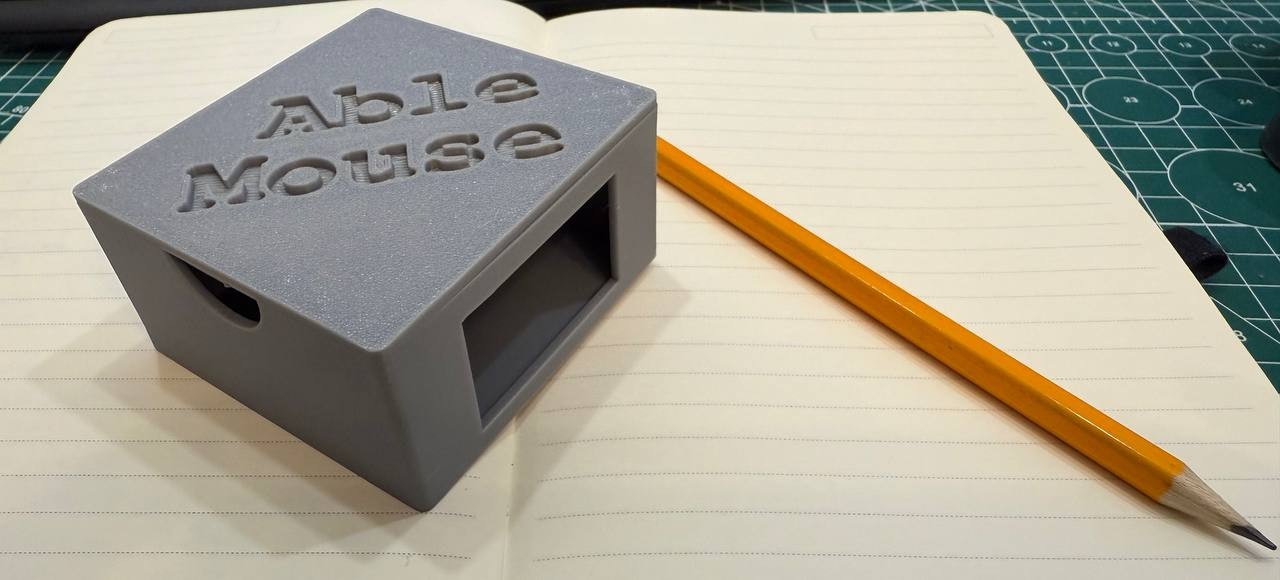
- 3D-Printable Case: The availability of a 3D-printable enclosure for the AbleMouse board simplifies the physical assembly for users and encourages DIY customization and community contributions. The open-source nature, built on ESP32 microcontrollers, allows for hackable firmware and hardware designs.
- Open-Source & Affordable: AbleMouse is an entirely open-source project, promoting community-driven improvements and custom modifications. Its sub-$10 build cost makes it an incredibly affordable alternative to commercial assistive technologies, eliminating significant financial barriers.
- High Precision and Adaptability: Despite its low cost, AbleMouse offers precise cursor tracking with a 100Hz polling rate, configurable sensitivity, and gesture recognition. The tongue control system incorporates machine learning-based motion stabilization algorithms for high cursor precision.
Potential Drawbacks & Areas for Improvement
While AbleMouse offers incredible value, a few areas could be considered for future enhancements. As a DIY solution, the initial setup and assembly, even with a 3D-printable case, might require a basic level of technical aptitude or assistance for some users. Clearer, more detailed step-by-step guides and community support forums could further simplify the onboarding process for non-technical users.
For MouseCommander, while gesture-driven menus are powerful, the learning curve for mastering specific gestures for various shortcuts might be a consideration. Providing an intuitive, interactive tutorial or a visual "gesture cheat sheet" within the software could significantly aid user adoption. Additionally, while currently a Windows-only component, extending MouseCommander's gesture-driven functionality to other operating systems like macOS, Linux, and even iPadOS (if technically feasible within Apple's guidelines) would further enhance the product's universal accessibility vision.
Bottom Line & Recommendation
AbleMouse, with its expanded OS support and the innovative MouseCommander tool, is a groundbreaking solution in the field of assistive technology. It's an indispensable tool for individuals with severe motor impairments seeking an affordable, customizable, and highly functional way to interact with computers and smart devices. The open-source nature fosters a community-driven ecosystem, ensuring continuous improvement and adaptation. Anyone looking for a cost-effective, adaptable, and robust alternative to traditional input methods or expensive commercial assistive devices should absolutely explore AbleMouse. Its commitment to accessibility and empowerment makes it a truly impactful product.